Difference between revisions of "Geographic Features"
Jump to navigation
Jump to search
(Marked this version for translation) |
|||
| (One intermediate revision by the same user not shown) | |||
| Line 4: | Line 4: | ||
<br /> | <br /> | ||
---- | ---- | ||
| − | [[File:Geographicf.jpg| | + | [[File:Geographicf.jpg|180px|caption|right]] |
| Line 10: | Line 10: | ||
<!--T:11--> | <!--T:11--> | ||
Starting in version 6, it's possible to import KML files to Air Navigation Pro. | Starting in version 6, it's possible to import KML files to Air Navigation Pro. | ||
| − | |||
| − | |||
| − | |||
| − | |||
| Line 30: | Line 26: | ||
<!--T:13--> | <!--T:13--> | ||
| − | [[File:Geographic.jpg]] | + | [[File:Geographic.jpg|450px]] |
| − | |||
| Line 39: | Line 34: | ||
* Open the message received on your iOS device and tap on the .kml file. | * Open the message received on your iOS device and tap on the .kml file. | ||
* Choose the option "Copy to Air Nav Pro" | * Choose the option "Copy to Air Nav Pro" | ||
| + | |||
<!--T:15--> | <!--T:15--> | ||
In the app itself, you can manage the imported files. You can: | In the app itself, you can manage the imported files. You can: | ||
| − | - Enable / Disable a particular file | + | <br /> |
| + | <br /> | ||
| + | - Enable / Disable a particular file <br /> | ||
- Delete a file (with help of the swipe gesture) | - Delete a file (with help of the swipe gesture) | ||
Latest revision as of 19:45, 11 February 2016

Starting in version 6, it's possible to import KML files to Air Navigation Pro.
KML files can contain shapes or lines. The features can be tapped on the moving map and additional information will be displayed.

To import KML files into Air Navigation Pro:
- Send to your e-mail address linked with your iOS device a .kml file.
- Open the message received on your iOS device and tap on the .kml file.
- Choose the option "Copy to Air Nav Pro"
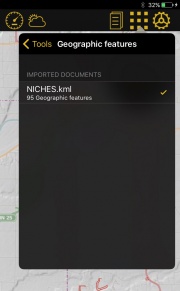
In the app itself, you can manage the imported files. You can:
- Enable / Disable a particular file
- Delete a file (with help of the swipe gesture)
Back to index.
