Difference between revisions of "Route synch/pt"
Jump to navigation
Jump to search
(Created page with "Administrador de rotas") |
|||
| (3 intermediate revisions by the same user not shown) | |||
| Line 2: | Line 2: | ||
<br /> | <br /> | ||
---- | ---- | ||
| − | [[File:routesync.jpg|leyenda|right]] | + | [[File:routesync.jpg|leyenda|right]] |
| + | As rotas podem ser importadas a partir do iPad/iPhone à Conta de Usuário utilizando a opção '''«Administrar rotas»''' que fica no painel de «Air Navigation Services». | ||
| − | + | Utilizando a mesma conta, as rotas no servidor podem ser baixadas diretamente no aparelho a partir da opção '''«Administrar rotas»''' no Air Navigation Pro. | |
| − | + | As rotas aparecerão nume lista na aba '''«Routes»''' sobre a barra da esquerda na conta do usuário. Também será possível abrir no mapa e descarregá-las nos formatos '''GPX''' e '''KML'''. | |
[[File:Routesync2.jpg]] | [[File:Routesync2.jpg]] | ||
Latest revision as of 20:12, 15 February 2016

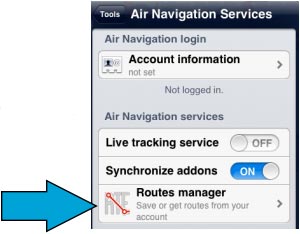
As rotas podem ser importadas a partir do iPad/iPhone à Conta de Usuário utilizando a opção «Administrar rotas» que fica no painel de «Air Navigation Services».
Utilizando a mesma conta, as rotas no servidor podem ser baixadas diretamente no aparelho a partir da opção «Administrar rotas» no Air Navigation Pro.
As rotas aparecerão nume lista na aba «Routes» sobre a barra da esquerda na conta do usuário. Também será possível abrir no mapa e descarregá-las nos formatos GPX e KML.

Back to index
