Difference between revisions of "Translations:Embedded Webserver/11/es"

From Air Navigation User Manuals
Jump to navigation Jump to search
(Created page with "caption|right|320pxSe puden enviar documentos PDF '''por Email''' a su iPhone/iPad. Si es agregado el código de cuatro letras ICAO como prefijo en el...")
 
 
Line 5: Line 5:
 
----
 
----
 
<br />
 
<br />
−
Volver al <u>[[Air Navigation iOS|índice]]</u>
+
Volver al <u>[[Air Navigation iOS/es|índice]]</u>
 
<br />
 
<br />

Latest revision as of 17:21, 6 November 2015

Information about message (contribute)
This message has no documentation. If you know where or how this message is used, you can help other translators by adding documentation to this message.
Message definition (Embedded Webserver)
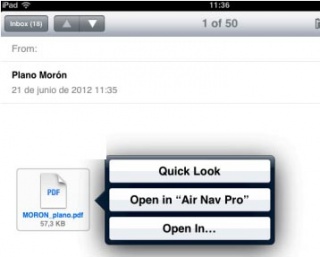
[[File:webserver3.jpg|caption|right|320px]]You can also send PDF documents '''by Email''' to your iPhone/iPad. If you add the 4 letter ICAO code as a prefix to the PDF name, you can use the «Open in Air Navigation» feature of the mail client. The pdf file will be automatically installed in Air Navigation.
<br/>
----
<u>'''Note:'''</u> You can also '''send routes in GPX format''' by email to your iPhone/iPad. Then, you can use the «Open in Air Navigation» feature of the mail client. The route file will be installed in Air Navigation.
----
<br />
Back to <u>[[Air Navigation iOS|index]]</u>
<br />
Translation[[File:webserver3.jpg|caption|right|320px]]Se puden enviar documentos PDF '''por Email''' a su iPhone/iPad. Si es agregado el código de cuatro letras ICAO como prefijo en el nombre del PDF, se puede utilizar la herramienta del Mail «Copiar en Air Navigation Pro». El PDF sera automáticamente instalado en Air Navigation.
<br />
----
<u>'''Nota:'''</u> Es posible también '''enviar rutas en formato GPX''' por Email a su iPhone/iPad. Luego, puede usar la opción del Mail «Copiar en Air Navigation». El archivo de la ruta será instalado en Air Navigation.
----
<br />
Volver al <u>[[Air Navigation iOS/es|índice]]</u>
<br />
caption

Se puden enviar documentos PDF por Email a su iPhone/iPad. Si es agregado el código de cuatro letras ICAO como prefijo en el nombre del PDF, se puede utilizar la herramienta del Mail «Copiar en Air Navigation Pro». El PDF sera automáticamente instalado en Air Navigation.


Nota: Es posible también enviar rutas en formato GPX por Email a su iPhone/iPad. Luego, puede usar la opción del Mail «Copiar en Air Navigation». El archivo de la ruta será instalado en Air Navigation.


Volver al índice