Difference between revisions of "Install updates"
Jump to navigation
Jump to search
(Marked this version for translation) |
|||
| (3 intermediate revisions by the same user not shown) | |||
| Line 1: | Line 1: | ||
| + | <languages /> | ||
| + | <translate> | ||
| + | <!--T:3--> | ||
| + | <br /> | ||
---- | ---- | ||
| − | [[File:MapStore_4.png|left| | + | [[File:MapStore_4.png|left|caption|200px]] |
| + | |||
| + | |||
| + | <!--T:4--> | ||
| + | Every time there is an update for a map, chart or 3D data, you will be notified by a red symbol as the screenshot shows beside. | ||
| + | |||
The red symbol will appear on both the bottom bar of the Map Store module and next to the product.
The reason for an update may be:
|
The red symbol will appear on both the bottom bar of the Map Store module and next to the product.
The reason for an update may be:
| ||
*A chart update that is part of your subscription is available;
| *A chart update that is part of your subscription is available;
| ||
*We found an issue with the chart/data and we released a fixed version. | *We found an issue with the chart/data and we released a fixed version. | ||
<br /> | <br /> | ||
| − | === Waypoints and Airspaces === | + | === Waypoints and Airspaces === <!--T:1--> |
In order to get more frequent updates from the waypoints and airspaces databases, you should proceed as follows: | In order to get more frequent updates from the waypoints and airspaces databases, you should proceed as follows: | ||
# Go to [http://services.xample.ch/ Xample Services] | # Go to [http://services.xample.ch/ Xample Services] | ||
| Line 14: | Line 23: | ||
#*
Free airspaces database | #*
Free airspaces database | ||
<br /> | <br /> | ||
| − | Then, on your iPad/iPhone:[[File:MapStore_5.png| | + | Then, on your iPad/iPhone:[[File:MapStore_5.png|right|caption|250px]] |
# Login with your User Account info under «Air Navigation Services»
(1) | # Login with your User Account info under «Air Navigation Services»
(1) | ||
# Make sure to have the option «Synchronize addons» enabled | # Make sure to have the option «Synchronize addons» enabled | ||
| Line 22: | Line 31: | ||
<youtube>bPKtGX-5JVc</youtube> | <youtube>bPKtGX-5JVc</youtube> | ||
| + | <!--T:2--> | ||
---- | ---- | ||
Back to <u>[[Air Navigation iOS|index]]</u> | Back to <u>[[Air Navigation iOS|index]]</u> | ||
| + | <br /> | ||
| + | </translate> | ||
Latest revision as of 19:50, 14 October 2015

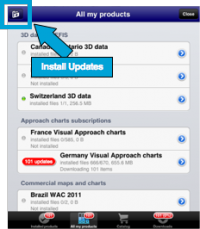
Every time there is an update for a map, chart or 3D data, you will be notified by a red symbol as the screenshot shows beside.
The red symbol will appear on both the bottom bar of the Map Store module and next to the product. The reason for an update may be:
- A chart update that is part of your subscription is available;
- We found an issue with the chart/data and we released a fixed version.
Waypoints and Airspaces
In order to get more frequent updates from the waypoints and airspaces databases, you should proceed as follows:
- Go to Xample Services
- Create a User Account
- Go to the Addons page
- SUBSCRIBE to:
- Free waypoints database
- Free airspaces database
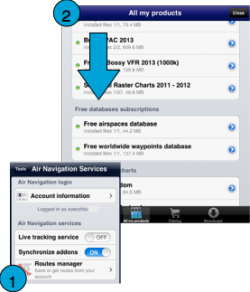
Then, on your iPad/iPhone:

- Login with your User Account info under «Air Navigation Services» (1)
- Make sure to have the option «Synchronize addons» enabled
- Go to «All my products»
- Download the Free Databases files. (2)
Back to index
