Difference between revisions of "Import/Export GPX files (Routes)"
Jump to navigation
Jump to search

(Marked this version for translation) |
|||
| Line 7: | Line 7: | ||
<!--T:2--> | <!--T:2--> | ||
| − | [[File:gpx.jpg|caption|left]] In order to '''Export a Route''', | + | [[File:gpx.jpg|caption|left]] In order to '''Export a Route''', press on the upper-right button located in the «Route Module» panel, then select the option '''“Send by email”.''' |
<br/> | <br/> | ||
[[File:danger.jpg|caption]] You must first have an Email account configured on your device. | [[File:danger.jpg|caption]] You must first have an Email account configured on your device. | ||
| Line 13: | Line 13: | ||
<!--T:3--> | <!--T:3--> | ||
| − | In | + | In order to '''Import a Route''', you have 3 alternatives: |
* Copy the GPX files directly into the folder advised by the button “Show GPX folder”. This folder will have all the Routes appearing in Air Nav Pro. | * Copy the GPX files directly into the folder advised by the button “Show GPX folder”. This folder will have all the Routes appearing in Air Nav Pro. | ||
* Select '''“Import GPX file”''', then you search for the GPX file and open it. | * Select '''“Import GPX file”''', then you search for the GPX file and open it. | ||
Latest revision as of 20:28, 14 October 2015
A Route in GPX format can be imported or exported from Air Navigation Pro.

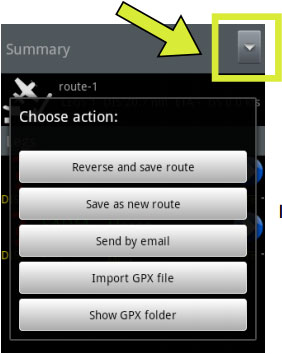
In order to Export a Route, press on the upper-right button located in the «Route Module» panel, then select the option “Send by email”.
 You must first have an Email account configured on your device.
In order to Import a Route, you have 3 alternatives:
- Copy the GPX files directly into the folder advised by the button “Show GPX folder”. This folder will have all the Routes appearing in Air Nav Pro.
- Select “Import GPX file”, then you search for the GPX file and open it.
- Use the “Open with” feature from outside Air Nav Pro.


Note: As an alternative, you can send a GPX file (Route) to your Email box and then open it directly on your device using the feature “Open with”.
Back to index.
