Difference between revisions of "Install updates/fr"
Jump to navigation
Jump to search
(Created page with "<br /> ---- left|caption|200px") |
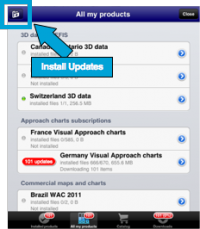
(Created page with "Les mises à jour ou “updates” d'un produit seront notifiés par un symbole rouge comme on le voit dans l'image à gauche.") |
||
| Line 5: | Line 5: | ||
| − | + | Les mises à jour ou “updates” d'un produit seront notifiés par un symbole rouge comme on le voit dans l'image à gauche. | |
The red symbol will appear on both the bottom bar of the Map Store module and next to the product.
The reason for an update may be:
|
The red symbol will appear on both the bottom bar of the Map Store module and next to the product.
The reason for an update may be:
| ||
Revision as of 14:52, 28 October 2015

Les mises à jour ou “updates” d'un produit seront notifiés par un symbole rouge comme on le voit dans l'image à gauche.
The red symbol will appear on both the bottom bar of the Map Store module and next to the product. The reason for an update may be:
- A chart update that is part of your subscription is available;
- We found an issue with the chart/data and we released a fixed version.
Waypoints and Airspaces
In order to get more frequent updates from the waypoints and airspaces databases, you should proceed as follows:
- Go to Xample Services
- Create a User Account
- Go to the Addons page
- SUBSCRIBE to:
- Free waypoints database
- Free airspaces database
Then, on your iPad/iPhone:

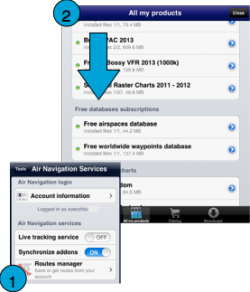
- Login with your User Account info under «Air Navigation Services» (1)
- Make sure to have the option «Synchronize addons» enabled
- Go to «All my products»
- Download the Free Databases files. (2)
Back to index
