Difference between revisions of "Translations:Map Store/3/en"
Jump to navigation
Jump to search
(Importing a new version from external source) |
(Importing a new version from external source) |
||
| Line 1: | Line 1: | ||
;Installed products | ;Installed products | ||
| − | : It shows the charts, maps and data that is currently installed in the app.
| + | : It shows the charts, maps and data that is currently installed in the app.
You can '''Re-install''' or '''Delete''' products partially or completely from here |
;All my products | ;All my products | ||
| − | :
It shows all the purchased charts, maps and data and the free products downloaded by the user, too. If you reinstall the application or lose a map, here you will get it back.
It also allows you to sync the products | + | :
It shows all the purchased charts, maps and data and the free products downloaded by the user, too. If you reinstall the application or lose a map, here you will get it back.
It also allows you to sync the products across the different platforms.
|
| − | ; | + | ;Catalog (iOS) / Download products (Android)
[[File:MapStore_2.png|caption|right|200px]] |
| − | : It is divided into two parts: | + | : In iOS It is divided into two parts: |
*by country: you can choose the country you are interested in and it will show all the charts/maps and data available for that country.
| *by country: you can choose the country you are interested in and it will show all the charts/maps and data available for that country.
| ||
*by product groups: it will show the products by their category.
| *by product groups: it will show the products by their category.
| ||
<br /> | <br /> | ||
| − | + | : In Android the products are displayed by category | |
| − | : | ||
| − | |||
| − | |||
| − | |||
| − | |||
Latest revision as of 15:48, 1 December 2015
- Installed products
- It shows the charts, maps and data that is currently installed in the app. You can Re-install or Delete products partially or completely from here
- All my products
- It shows all the purchased charts, maps and data and the free products downloaded by the user, too. If you reinstall the application or lose a map, here you will get it back. It also allows you to sync the products across the different platforms.
- Catalog (iOS) / Download products (Android)
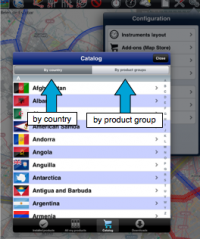
- In iOS It is divided into two parts:

- by country: you can choose the country you are interested in and it will show all the charts/maps and data available for that country.
- by product groups: it will show the products by their category.
- In Android the products are displayed by category
