Difference between revisions of "Create user waypoints"
Jump to navigation
Jump to search


(Created page with "---- caption|left|250px A «user waypoint» can be created as follows: - directly on the «moving map» by pressing and holding for 2 seconds on the d...") |
|||
| Line 5: | Line 5: | ||
| − | - | + | - Directly on the «moving map» by pressing and holding for 2 seconds on the desired location of the map. |
| − | - | + | - From the «Custom waypoint Editor» under Tools menu. |
Revision as of 19:26, 5 October 2015

A «user waypoint» can be created as follows:
- Directly on the «moving map» by pressing and holding for 2 seconds on the desired location of the map.
- From the «Custom waypoint Editor» under Tools menu.

Once you have created your waypoint, it should appear on the map. Example below.


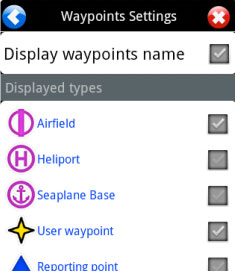
If your waypoint does NOT appear on the map, then check that the type of waypoint you created is selected in «Map Options».

Back to index.
