Difference between revisions of "Assign an Aircraft profile to a mission/fr"
Jump to navigation
Jump to search

(Created page with "Attribuer un profil de l’appareil à une mission") |
(Created page with "<br /> ---- caption|rightUn profil de l’appareil est affecté à une mission à partir de l'onglet "Mission" comme illustré par l’image à droite.") |
||
| Line 2: | Line 2: | ||
<br /> | <br /> | ||
---- | ---- | ||
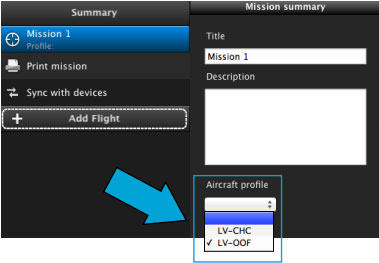
| − | [[File:macc.jpg|caption|right]] | + | [[File:macc.jpg|caption|right]]Un profil de l’appareil est affecté à une mission à partir de l'onglet "Mission" comme illustré par l’image à droite. |
Revision as of 18:22, 22 October 2015

Un profil de l’appareil est affecté à une mission à partir de l'onglet "Mission" comme illustré par l’image à droite.

You must first create the aircraft
profile through the Library TAB.
If you want to assign a different aircraft to a second flight, you have to create a new mission.
The importance of assigning a profile:

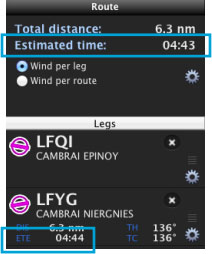
It is needed to calculate the estimated times for the total distance of a route and per each leg, too.

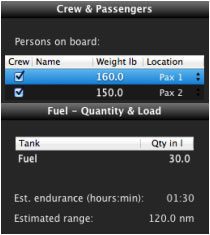
The crew and fuel quantity will be editable only if the Weight and
Balance module was completed in the profile.
The Weight and Balance information entered by the user will be computed together with crew and fuel values to finally generate a graph.

Back to index
