Difference between revisions of "Translations:Live tracking service/3/en"
Jump to navigation
Jump to search
(Importing a new version from external source) |
(Importing a new version from external source) |
||
| Line 1: | Line 1: | ||
| − | + | [[File:track1.jpg|leyenda|right]]The process will start when the '''Block-off''' time has been set in the '''«Flight Time»''' module. | |
| − | [[File: | + | <br /> |
| − | + | <br /> | |
| − | + | (iOS) | |
| − | <br/> | + | <br /> |
| − | [[File:flightloc5.jpg]] | + | Remember that it can be automatically configured in the settings. |
| + | Once Block-of time is set, Air Nav Pro will record the flight live to your '''User Account.''' | ||
| + | The recording will finish as soon as the '''Block-on''' time is established. | ||
| + | <br /> | ||
| + | <br /> | ||
| + | <br /> | ||
| + | [[File:flightloc5.jpg]] (Android) | ||
Latest revision as of 14:30, 25 November 2015

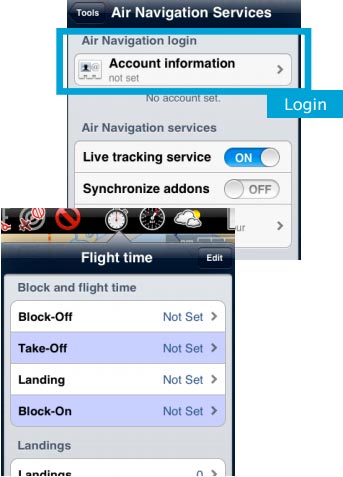
The process will start when the Block-off time has been set in the «Flight Time» module.
(iOS)
Remember that it can be automatically configured in the settings.
Once Block-of time is set, Air Nav Pro will record the flight live to your User Account.
The recording will finish as soon as the Block-on time is established.
 (Android)
