Difference between revisions of "Purchase/install charts"
Jump to navigation
Jump to search

| Line 10: | Line 10: | ||
| − | [[File:install2.jpg|leyenda|left|290px]]< | + | [[File:install2.jpg|leyenda|left|290px]]<u>'''Note 1:'''</u> the same procedure will apply for when having to restore purchases on a second device. |
| − | + | <br/> | |
| − | < | + | <u>'''Note 2:'''</u> Account information will be found under '''Tools - Air Navigation services.''' |
Revision as of 15:59, 13 October 2015

In order to install purchases made in the Addons page, you will proceed as follows:
- Run Air Nav Pro on your iPad/iPhone;
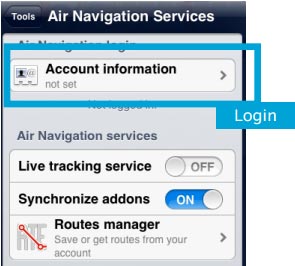
- Login with your User Account info under «Air Navigation Services» panel;
- Make sure to have the option «Synchronize addons» enabled;
- Open the «Map Store» module and go to the «All my products» section.
- Wait until all your purchases are synchronized.
- Press on the product name and install it.

Note 1: the same procedure will apply for when having to restore purchases on a second device.
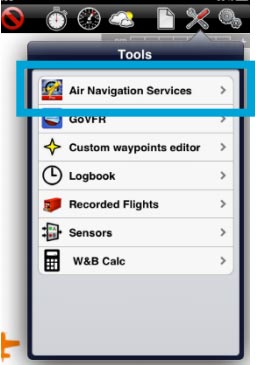
Note 2: Account information will be found under Tools - Air Navigation services.

Back to index
