Difference between revisions of "Map Store/pt"
Jump to navigation
Jump to search

(Created page with "<br /> ---- A Map Store é dividido em 4 partes:") |
(Created page with "caption|left|200pxcaption|right|100px Depois de ter instalado um mapa ou uma carta, você será capaz de configurá-lo a partir...") |
||
| Line 33: | Line 33: | ||
[[File:mapstore4.jpg|caption|left|200px]][[File:mapoptions.jpg|caption|right|100px]] | [[File:mapstore4.jpg|caption|left|200px]][[File:mapoptions.jpg|caption|right|100px]] | ||
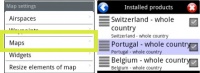
| − | + | Depois de ter instalado um mapa ou uma carta, você será capaz de configurá-lo a partir do módulo «[[Map Options menu|Map Options]]». | |
| − | + | Outros produtos, como os dados de elevação gratuitos e as cartas de aproximação geo-referenciadas não vão ser exibidos no «Map Options», mas somente na aba «Installed products» do MapStore. | |
---- | ---- | ||
Revision as of 17:54, 1 December 2015
A Map Store é dividido em 4 partes:
 (iOS)
 (Android)
- Installed products
- It shows the charts, maps and data that is currently installed in the app. You can Re-install or Delete products partially or completely from here
- All my products
- It shows all the purchased charts, maps and data and the free products downloaded by the user, too. If you reinstall the application or lose a map, here you will get it back. It also allows you to sync the products across the different platforms.
- Catalog (iOS) / Download products (Android)
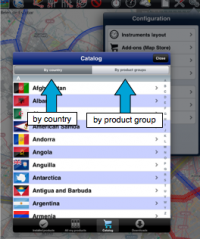
- In iOS It is divided into two parts:

- by country: you can choose the country you are interested in and it will show all the charts/maps and data available for that country.
- by product groups: it will show the products by their category.
- In Android the products are displayed by category
- Downloads / Download queue
- It lists current and pending downloads. This module is typically used to monitor download progression of a product. It is possible to reorder/delete the downloads or cancel all by pressing on the Edit button located on the upper left corner.

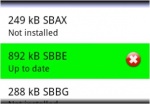
Installed products appear in different colours according to the state. In Android the background color changes, in iOS the dot next to the product name:
- White: maps are not installed;
- Green: maps are installed and up to date;
- Orange: new version available for download.


Depois de ter instalado um mapa ou uma carta, você será capaz de configurá-lo a partir do módulo «Map Options». Outros produtos, como os dados de elevação gratuitos e as cartas de aproximação geo-referenciadas não vão ser exibidos no «Map Options», mas somente na aba «Installed products» do MapStore.
Back to index (Android)
Back to index (iOS)
