Difference between revisions of "Overlaying/fr"
Jump to navigation
Jump to search
(Created page with "Superposition (“Parties manquantes” dans la carte)") |
(Created page with "<br /> ---- frameDans la capture d’écran à droite, on montre à la fois la carte “Brazil WAC 2011” et la carte “Uruguay - Free”. La carte de B...") |
||
| Line 2: | Line 2: | ||
<br /> | <br /> | ||
---- | ---- | ||
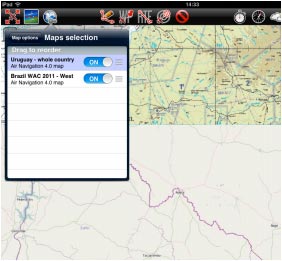
| − | [[File:over_l1.jpg|frame]] | + | [[File:over_l1.jpg|frame]]Dans la capture d’écran à droite, on montre à la fois la carte “Brazil WAC 2011” et la carte “Uruguay - Free”. La carte de Brazilian semble être coupée, mais en fait, celle d’Uruguay est en <span style="color:#ff0000">superposition</span>. |
[[File:over_l.jpg]] | [[File:over_l.jpg]] | ||
Revision as of 17:20, 29 October 2015

Dans la capture d’écran à droite, on montre à la fois la carte “Brazil WAC 2011” et la carte “Uruguay - Free”. La carte de Brazilian semble être coupée, mais en fait, celle d’Uruguay est en superposition.

You can solve this problem by simply moving the charts up or down in the «Maps» panel or switching them ON or OFF. On the picture on the right, we show the chart from Uruguay on top of the one from Brazil. So, if we move it below, the latter will show on top of the former. This is shown on the picture above. We move the charts by pressing and holding from the right edge (where the three-line mark is).
Back to index
