Difference between revisions of "Route synch/fr"
Jump to navigation
Jump to search
(Created page with "Synchroniser les itinéraires") |
(Created page with "<br /> ---- leyenda|rightLes itinéraires peuvent être importés depuis l'iPhone / iPad au compte d'utilisateur grâce au '''«Routes manager»''' qui...") |
||
| Line 2: | Line 2: | ||
<br /> | <br /> | ||
---- | ---- | ||
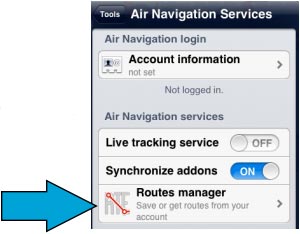
| − | [[File:routesync.jpg|leyenda|right]] | + | [[File:routesync.jpg|leyenda|right]]Les itinéraires peuvent être importés depuis l'iPhone / iPad au compte d'utilisateur grâce au '''«Routes manager»''' qui se trouve dans le module «Air Navigation Services». |
Revision as of 19:39, 29 October 2015

Les itinéraires peuvent être importés depuis l'iPhone / iPad au compte d'utilisateur grâce au «Routes manager» qui se trouve dans le module «Air Navigation Services».
If using a second device, with the same User Account, routes from on the server can be downloaded directly into that device through the «Routes manager» panel in Air Nav Pro.
The routes will be stored in the «Routes» tab of the left bar and they can be viewed displayed on the map and can also be downloaded as GPX files or KML files following the same procedure as with the flights.

Back to index
