Difference between revisions of "Create a new mission/de"
Jump to navigation
Jump to search
(Created page with "<blockquote>'''Um eine Mission zu löschen, löschen Sie einfach die Datei aus dem Ordner.''' </blockquote><br />") |
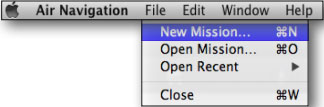
(Created page with "right|caption Wollen Sie selbst eine neue Mission erstellen, dann sollten Sie es vom '''«File»''' Top-Menü durchführen. <br />") |
||
| Line 8: | Line 8: | ||
<blockquote>'''Um eine Mission zu löschen, löschen Sie einfach die Datei aus dem Ordner.''' </blockquote><br /> | <blockquote>'''Um eine Mission zu löschen, löschen Sie einfach die Datei aus dem Ordner.''' </blockquote><br /> | ||
| − | [[File:mac3.jpg|right|caption]] | + | [[File:mac3.jpg|right|caption]] Wollen Sie selbst eine neue Mission erstellen, dann sollten Sie es vom '''«File»''' Top-Menü durchführen. |
| − | <br/> | + | <br /> |
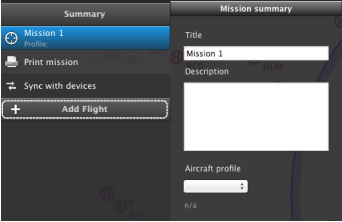
[[File:mac4.jpg|left|caption]]From the Mission TAB you will write the '''name of the mission''' and choose the '''aircraft profile''' once it is created. | [[File:mac4.jpg|left|caption]]From the Mission TAB you will write the '''name of the mission''' and choose the '''aircraft profile''' once it is created. | ||
Revision as of 17:07, 30 October 2015
Wenn Sie Air Navigation Desktop starten, werden Sie aufgefordert eine neue Mission in einem Verzeichnis Ihres Mac Computer zu speichern.

Um eine Mission zu löschen, löschen Sie einfach die Datei aus dem Ordner.

Wollen Sie selbst eine neue Mission erstellen, dann sollten Sie es vom «File» Top-Menü durchführen.

From the Mission TAB you will write the name of the mission and choose the aircraft profile once it is created.
You can also create one or more flights clicking on the “Add Flight” button.
Back to index
