Translations:Chronometer/Alarm/2/es
Jump to navigation
Jump to search
Presionando en:
- - "UTC" cambiará el tiempo exhibido entre hora Local o UTC (Z).
- - La pestaña "Chronometer" or "Alarm" cambiará su función.
Cronómetro

Cuando el cronómetro está seleccionado por debajo de la hora encontrará dos contadores: Stop Watch y ETE.
- Puede COMENZAR el cronómetro tocando sobre el botón de "Play" (reproducir) ubicado sobre el lado izquierdo.
- When the Stop Watch is running, you have the option to PAUSE IT with the "Stop" button on the left (same as the "Play" button).
- With the Stop Watch stopped you can either select to RESTART the Chronometer by pressing the "Play" button on the left or to RESET the time by pressing the "Arrow" button on the right.
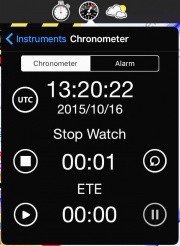
- Pressing on the "Pause" button on the left when the Stop Watch is running will trigger the "Lap function". The time will continue running but it will display the time of the moment when the "Pause" button was pressed.

Beneath the Stop Watch is the Elapsed Time (ETE) indicator. It works like the Stop Watch but it will display Hours and Minutes instead of Minutes and Seconds.
