Synchronize routes with your iOS device
Jump to navigation
Jump to search
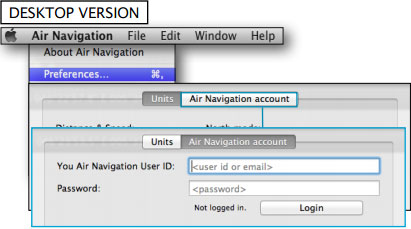
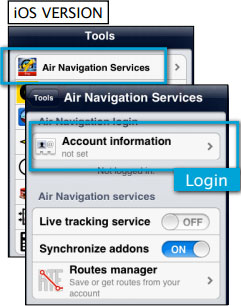

The routes created in Air Nav Desktop can be easily copied to your iPad or iPhone following the steps below:
- Login with your Xample Services account on Air Nav Desktop and also on your iOS device


 Both the Mac computer and the iOS device must be
connected to the same wifi network.
- From the Mission TAB, go to «Sync with devices»
- Select the device and click on «Synchronize» button

All the routes in the mission will be synchronized with the iOS device.
Example: if you have a mission with 3 different flights, all 3 flights will be transferred to your iPad/iPhone.
Routes stored in the Library TAB will NOT be transferred.
Back to index
