Translations:Connecting to X-Plane/13/en
Jump to navigation
Jump to search
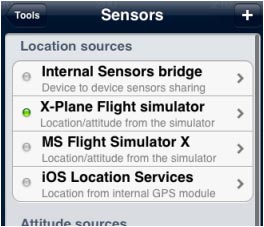
- make sure you have your iPad/iPhone and your PC connected to the same wifi network;
- make sure to switch the X-Plane Sensors ON in the «Tools» menu.

Troubleshooting
Test X-Plane and ANP connexion
- Start X-Plane simulation ̈
- Start Plugin (Plugin – Air Navigation – Start Air Navigation bridge) ̈
- View info (Plugin – Plugin Admin – Plugin Information) ̈
Air Navigation (Enabled)
- Start ANP ̈
- Enable Connexion (Tools – Sensors – X-Plane Flight sim – Sensor – ON) ̈
- wait 30s
