Translations:Embedded Webserver/2/en
Jump to navigation
Jump to search
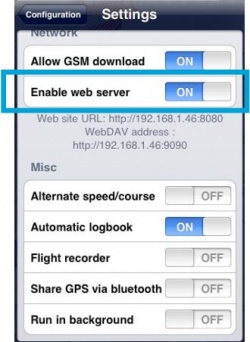


The web server must be turned on in the «Settings». If the web server is on, its network address will appear just below the web server switch (see screenshot beside). Example: http://192.168.46:8080
To access the embedded web server, type this address in the URL bar in a reasonably up to date Internet Browser (Firefox 3, Safari 4, Explorer 8) on your computer and press return. Air Navigation web site should appear in your navigator.

If you fail to connect, try several times and on different browsers.
